Veloso
Content and style
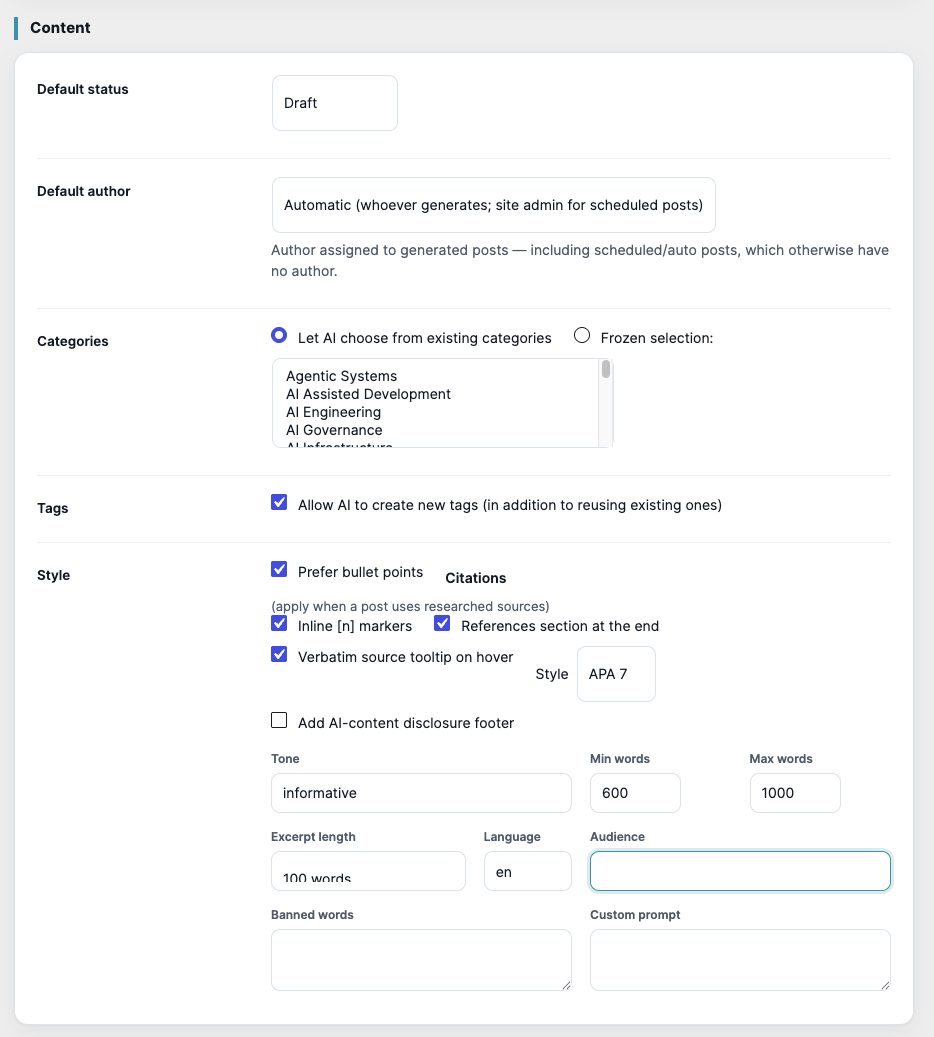
Status, author, categories, tags, tone, length, language and your own prompt.
All of these are in AI Poster › Settings › Content. They apply to every post, manual or scheduled.
- Default status and Default author for new posts.
- Categories: Let AI choose from existing categories, or a Frozen selection that every post uses.
- Tags: existing tags are always reused; tick Allow AI to create new tags to add new ones too.
- Style: Prefer bullet points for scannable posts.
- Citations (when a post uses researched sources): inline [n] markers, a references section at the end, and a verbatim source tooltip on hover. Citations are formatted in APA 7.
- Add AI-content disclosure footer: a short note at the end of each post.
- Tone, Min words and Max words, Excerpt length (50, 100, 200 or 300 words), Language and Audience.
- Banned words: words the AI must not use.
- Custom prompt: house rules added to every request, for example your brand voice.
To undo experiments, use ↺ Reset to recommended settings at the top of the Settings page. It keeps your API keys, licence, subjects and hub address.
In the plugin