Veloso
Social sharing
Share every post to LinkedIn, Facebook, X, Mastodon and Bluesky, with one-click connect.
Paid feature. Social sharing is part of the paid plans, which are coming soon.
Connect your accounts
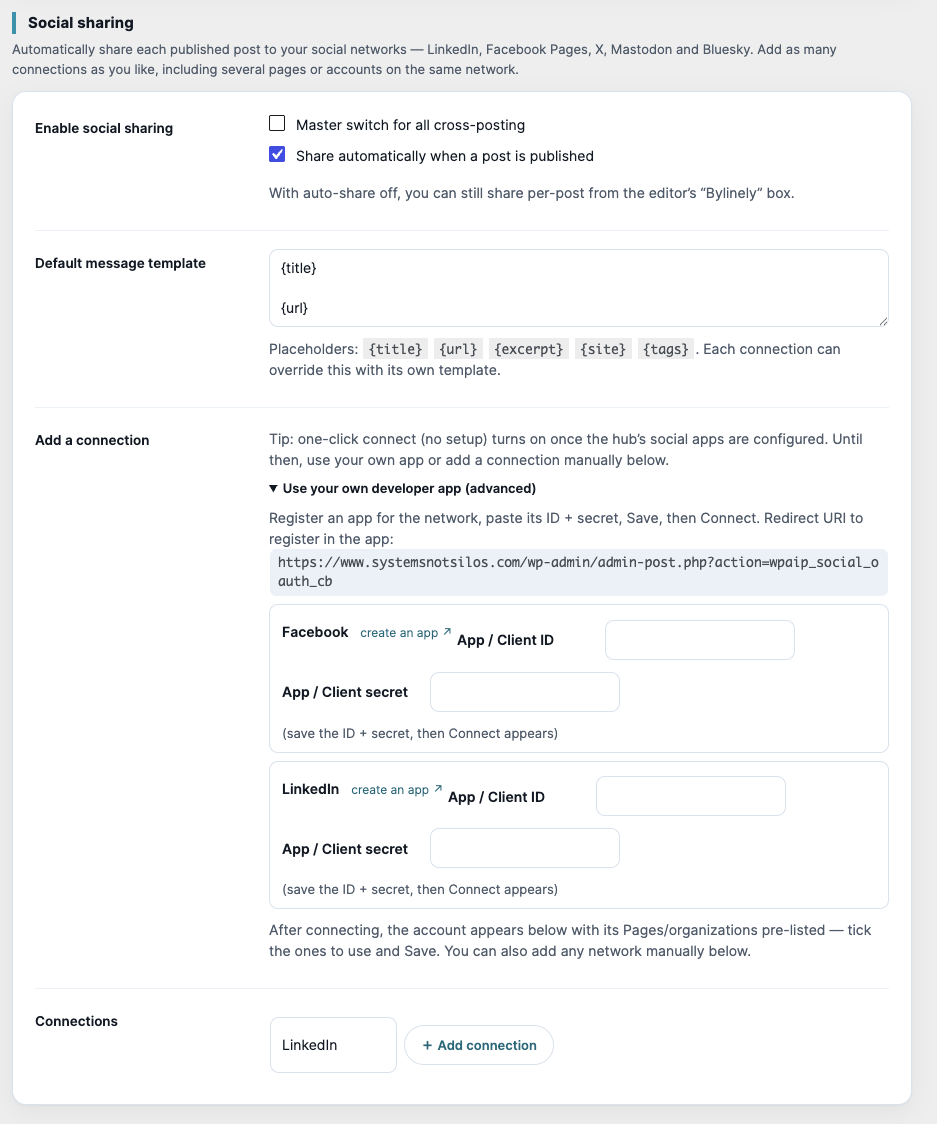
- In Settings › Social sharing, tick Enable social sharing.
- Under Add a connection, click Connect LinkedIn or Connect Facebook, sign in, and pick the Pages or profiles to post to. There is no developer app to set up and no token to paste.
- For X, Mastodon and Bluesky, or to use your own developer app, open Use your own developer app (advanced) and follow the create an app link.
- Use Fetch destinations on a connection to list every Page or organisation it can post to, tick the ones to use, and save. One post fans out to every ticked destination.
- Click Test on a connection to check it.
What gets shared
- Tick Share automatically when a post is published, or share by hand from the editor.
- The Default message template supports
{title},{url},{excerpt},{site}and{tags}. Each connection can override it. - The featured image is uploaded to each network as real media, falling back to a link card if that fails.
- Sharing runs in the background, so publishing is never slowed down.
Per-post controls
In the editor's 📣 Social sharing panel: choose connections, write a custom message, tick Don’t auto-share this post on publish, or click 📣 Share now. The panel shows the result for each destination, with links.
In the plugin