Veloso
Generating posts
The Generate page, the editor panel, and what each option does.
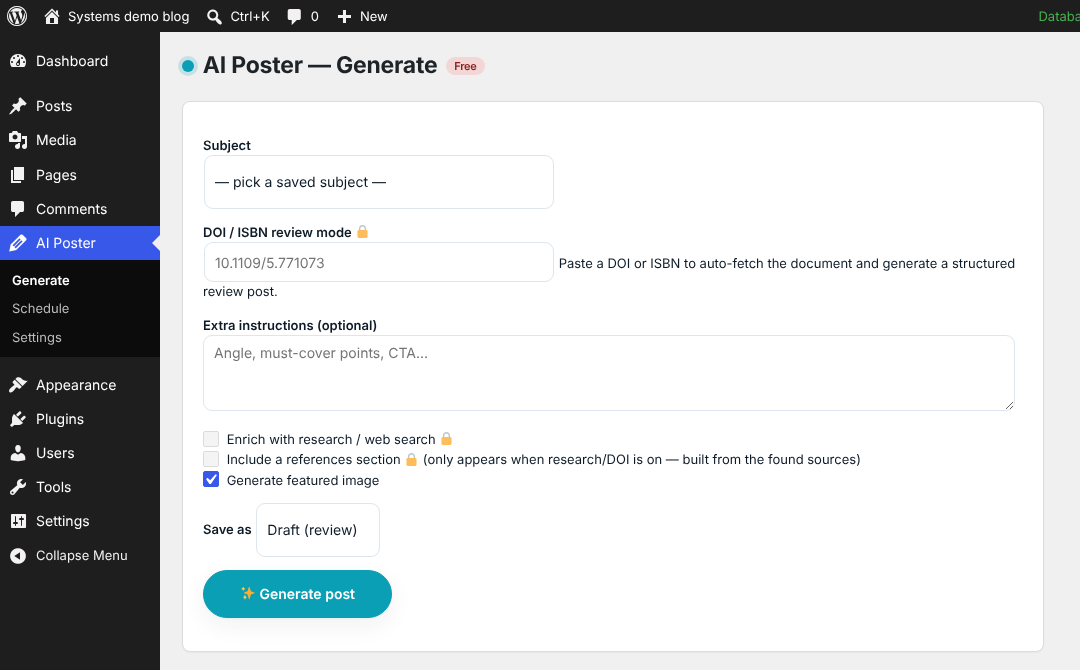
From the Generate page
AI Poster › Generate creates a new post.
- Subject: what the post is about. Type one, or pick from your saved subjects (Settings › Subjects).
- DOI / ISBN review mode (paid): paste a DOI or ISBN to fetch the paper or book and write a structured review. See Research and citations.
- Extra instructions: an angle, points to cover or a call to action, for this post only.
- Enrich with research / web search (paid) and Include a references section: the references section only appears when research or DOI mode is on, and is built from the sources found.
- Generate featured image: needs an OpenAI key.
- Save as: Draft, Pending review or Publish now.
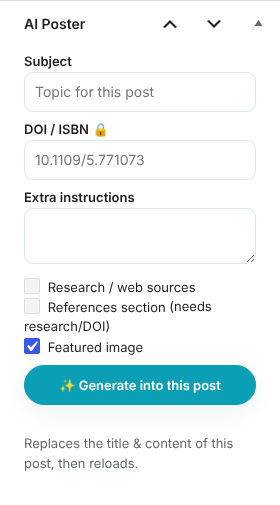
Inside the post editor
Every post has an AI Poster panel in the editor sidebar. Fill in the subject (or a DOI / ISBN), extra instructions, research and image options, then click ✨ Generate into this post. It replaces the title and content of the post you are editing, then reloads the page. The panel shows which engine wrote the post and its estimated cost.
What every post gets
- A title, body, and a self-contained excerpt (length set in Content).
- A category and tags: existing ones are reused, and new tags are added if you allow it.
- An author: the Default author setting, falling back to the site administrator for scheduled posts.
- A featured image with title, alt text, caption and description, when image generation is on.
In the plugin